Navigation
A fact points at code. One action takes you to that code, and one more takes you to the code around it.
Status: available
Blast radius
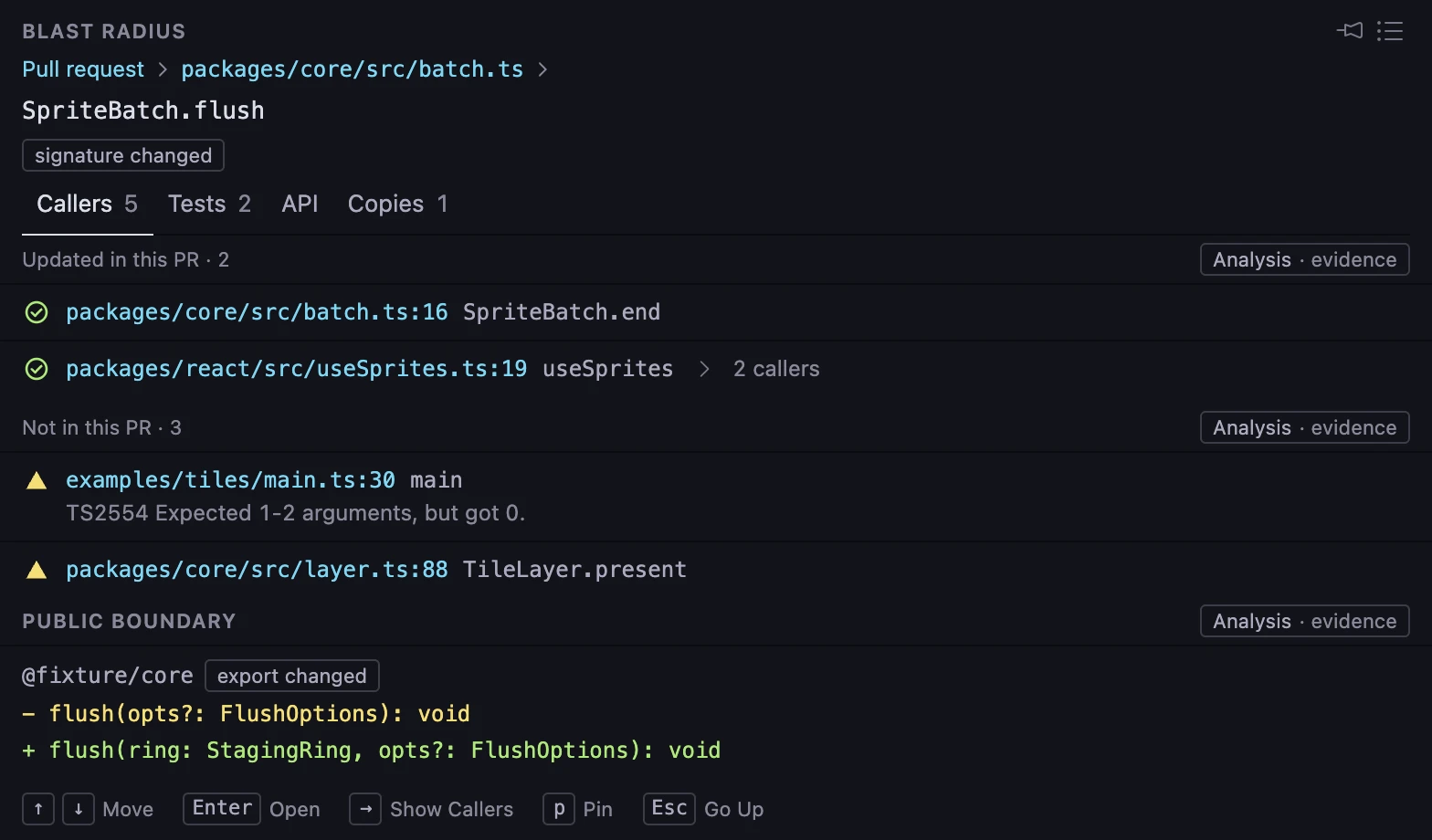
- 1. See callers outside the pull request alongside code that already changed.
- 2. Callers that the pull request updated.
- 3. Review evidence links to the relevant code.
- 4. A caller has callers. Open the row to see them.
The illustration shows how affected code is grouped for review.
Blast Radius
Facts on the lines that they are about
price.ts · structural
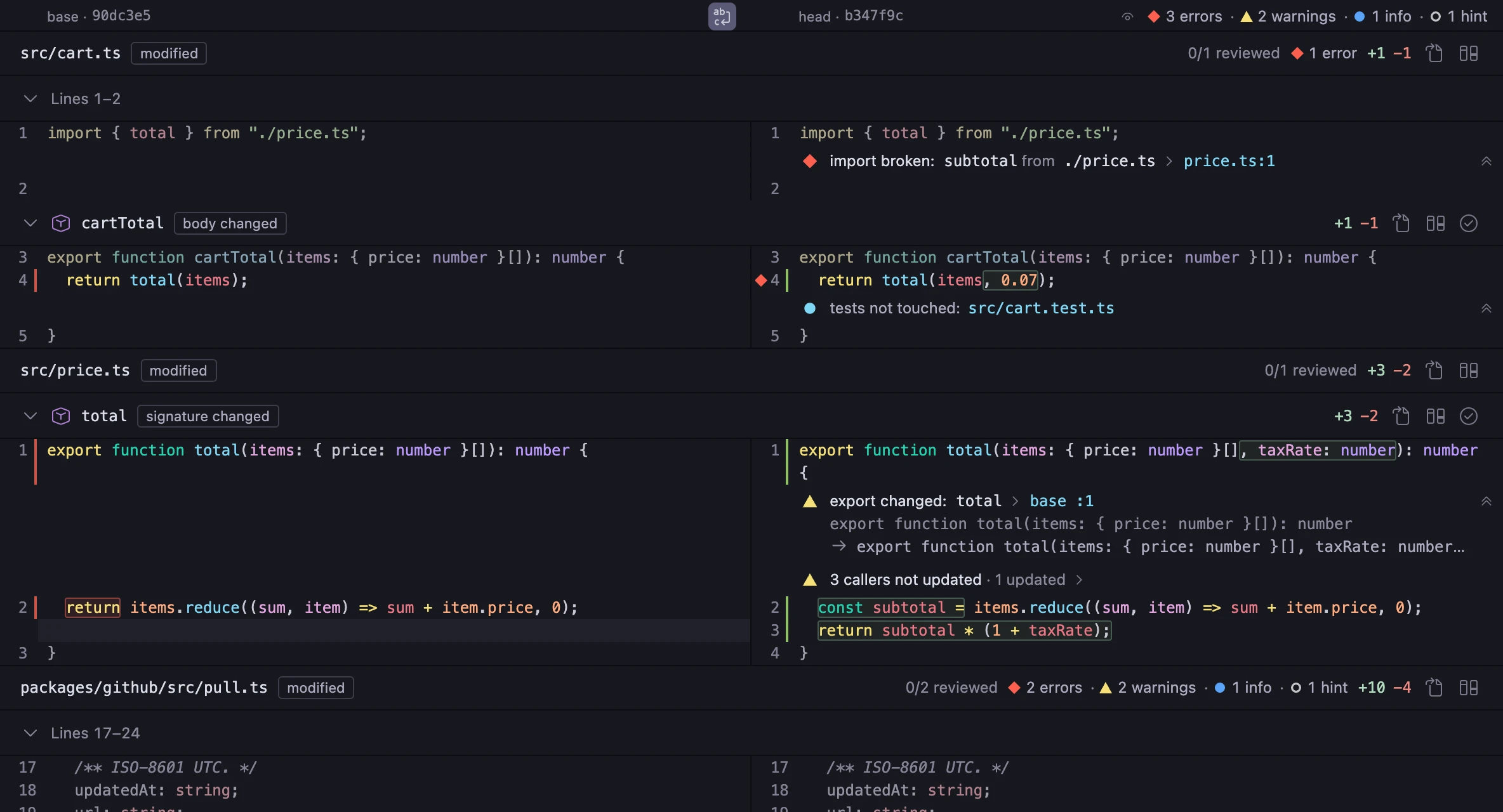
- 1. An import that is broken, on the line of the import.
- 2. An export that changed, with the signature at base and at head.
- 3. Callers that were not updated. The row opens the list of callers.
- 4. The pane header counts the facts of the diff.
What the panel lists
Deep static analysis links the changed symbol to its surrounding code.
- Callers not updated
- Code that calls the symbol and that the pull request did not change.
- Callers updated
- Code that calls the symbol and that the pull request changed.
- Broken imports
- Imports of the symbol that do not resolve at head.
- Tests
- The tests of the symbol, touched or not touched.
- Same code elsewhere
- Duplication that the pull request introduced.
Deep static analysis links callers and broken imports to the relevant code. TypeScript and JavaScript are supported today.
From a fact to the code
- b
- In the change map: show the blast radius of the symbol.
- ↑↓
- In the panel: move between rows.
- Enter
- In the panel: open the file at the line of the row.
- →
- In the panel: show the callers of a caller.
- p
- In the panel: pin the symbol.
- Esc
- In the panel: show the list of symbols.
- o
- In the diff: open the file at the line.
The panel shows the symbol that is in view in the diff. Pin a symbol to keep it while you read other code. All keys
The change map follows the diff
Scroll the diff, and the change map shows the symbol that is in view. Select a symbol in the change map, and the diff goes to it.
You do not look for your place in two views.
How to open it
- Select a changed symbol in the change map.
- Press b, or run the command
Oaink: Show Blast Radius. - Select a caller and press Enter. VS Code opens the file at the call.
Other features
- Structural diffavailableRead symbols, not hunks. Only the tokens that changed have a mark.
- Signalspartly availableDeep static analysis in one Overview, with a reading order.
- Review flowpartly availableA reviewed mark belongs to the content of a symbol. A new push opens again only what changed.
- The CLI for agentspartly availableThe same facts for an agent: one fact on each line, as JSON. It also shows a review draft.
- Oaink ProPlannedLens, agent context and CLI automation. Your review stays in your hands.
- Local-firstavailableOaink runs on your machine. It does not track your use.
Oaink is not released.
When it is, it installs from the VS Code Marketplace. Getting started